Securing your boot device
The boot device is essential to your Unraid server, as it stores all configuration data, licensing, and system settings. Due to its importance, it is crucial to keep its contents secure and accessible at all times.
In Unraid 7.3.0 and later, the WebGUI uses Boot device on the Main tab (for example Boot Device settings and backups). On earlier releases, the same controls are labeled Flash or Flash device. Use whichever label your version shows.
Backups
Having a recent backup of your boot device ensures you can quickly recover from hardware failures, accidental changes, or data corruption. Be sure to create backups in the following situations:
- Vor dem Upgrade von Unraid oder der Installation von Plugins
- Nach dem Hinzufügen oder Entfernen von Laufwerken
- Nach Änderungen an Netzwerk-, Freigabe- oder Sicherheitseinstellungen
- Vor wesentlichen Konfigurationsänderungen
- Regelmäßig im Rahmen Ihrer Wartungsroutine
To back up your boot device using the Unraid WebGUI, follow these steps:
- Select your boot device from the Main tab.
- In the Boot Device tab, click Boot Device Backup.
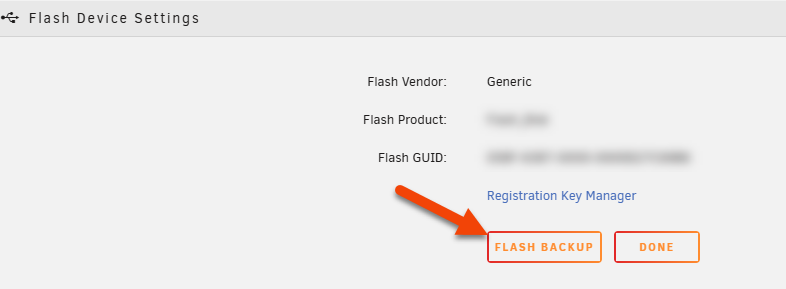
- Unraid will create a ZIP file containing the boot device's contents.
- Speichern Sie diese ZIP-Datei an einem sicheren Ort außerhalb Ihres Unraid-Servers (z.B. auf einem separaten PC, NAS oder in einer Cloud).
Wenn Sie Ihr Startlaufwerk neu erstellen müssen, verwenden Sie dieses Backup mit dem USB Creator Tool über die Option Benutzerdefiniert verwenden.
Erwägen Sie, nach Hardware-Änderungen einen Screenshot Ihrer Laufwerkszuweisungen zu speichern. Dies sorgt für eine korrekte Festplattenplatzierung, falls Sie von Ihrem Backup wiederherstellen müssen.
Netzwerkzugriff
You can control whether your boot device is accessible over the network, similar to other shares in Unraid. However, network access should be restricted since the boot device contains sensitive configuration and licensing data. Consider the following:
- Network visibility: Decide if your boot device should be visible or hidden on your network.
- Zugriffsrechte: Wenn der Netzwerkzugriff aktiviert ist, legen Sie Berechtigungen fest, um zu begrenzen, wer die Inhalte anzeigen oder ändern kann.
- Disable sharing: Set the boot device's SMB export to No to prevent network access entirely.
- Restrict access: If you must share the boot device, set security to Private and grant access only to trusted users with strong passwords.
- Avoid public access: Never leave the
flashshare set to Public or Secure with guest write access.
Diese Schritte tragen dazu bei, unerlaubte Änderungen oder die Offenlegung kritischer Dateien zu verhindern.
Berechtigungen
To enhance system security, files on the boot device can no longer be given execute permission. This change prevents malicious or unintended code from running directly off the boot device, reducing the risk of exploitation or accidental system modification.
If you have custom scripts or programs stored on the boot device, follow these steps:
-
Kopieren Sie Skripte an einen ausführbaren Ort:
- Verwenden Sie
/usr/local/bin, wenn Sie die Skripte im Standard-Systempfad wollen. - Automatisieren Sie dies, indem Sie Kopierbefehle in Ihre
config/go-Datei einfügen. - Setzen Sie nach dem Kopieren die Ausführungsrechte auf die Dateien.
- Verwenden Sie
-
Skripte mit einem Interpreter ausführen:
- Schließen Sie das Skript mit dem Interpreter ein (z.B.
bash /boot/config/scripts/myscript.sh).
- Schließen Sie das Skript mit dem Interpreter ein (z.B.
Dieser Ansatz hält Ihr System sicher, während fortgeschrittene Benutzer ihre Skripte ausführen können.